Study Workspaces
A critical part of Maestro's design is managing study workspaces. The motivating philosophy that your study is a computational process that you may run many data sets (parameters) through requires mechanisms for isolating those computaional experiments from eachother. There are a few hooks on the cli and in the spec that expose control of these workspaces.
In this section we'll be working with variants of the multi-step demo spec shown below for all examples and discussion:
Workspaces Demo Study Specification
description:
  name: workspaces_demo
  description: |
      Simple study used to demonstrate study and step workspace
      behaviors

env:
  variables:
    OUTPUT_PATH: ./WORKSPACES_DEMOS # (1)

study:
  - name: donor-sim
    description: Simple step using a subset of parameters
    run:
      cmd: |
        echo "Used Parameters: RES: $(RES)"

  - name: acceptor-sim
    description: Simple dependent step using all parameters
    run:
      cmd: |
        echo "Used Parameters: RES: $(RES), SHIFT_X: $(SHIFT_X)"

      depends: [donor-sim]

global.parameters:
  RES:
    values: [1, 1, 2, 2] # (2)
    label: RES.%%

  SHIFT_X:
    values: [3, 5, 3, 5] # (3)
    label: SHIFT_X.%%
- Contain all instances of this study (one per
maestro run ...call) in this directory - Note there are only two unique values
- There are 2 unique values of this parameter for each unique value of the
RESparameter, yielding a hierarchical study graph topology
Workspaces Demo Study Topology
This workflow has the following topology:
graph TD
    root["Workspace Demo Study"]

    subgraph donor_used_combos["donor-sim Used Combinations"]
        donor_sim_instance_0["donor-sim_instance_0<br/>RES: 1"]
        donor_sim_instance_1["donor-sim_instance_1<br/>RES: 2"]
    end

    subgraph acceptor_used_combos["acceptor-sim Used Combinations"]
        acceptor_sim_instance_0["acceptor-sim_instance_0<br/>RES: 1<br/>SHIFT_X: 3"]
        acceptor_sim_instance_1["acceptor-sim_instance_1<br/>RES: 2<br/>SHIFT_X: 5"]
        acceptor_sim_instance_2["acceptor-sim_instance_2<br/>RES: 1<br/>SHIFT_X: 3"]
        acceptor_sim_instance_3["acceptor-sim_instance_3<br/>RES: 2<br/>SHIFT_X: 5"]
    end

    root --> donor_sim_instance_0
    root --> donor_sim_instance_1

    donor_sim_instance_0 --> acceptor_sim_instance_0
    donor_sim_instance_0 --> acceptor_sim_instance_1

    donor_sim_instance_1 --> acceptor_sim_instance_2
    donor_sim_instance_1 --> acceptor_sim_instance_3
Study Level Workspace Controls
OUTPUT_PATH
There is a reserved variable/token you can set in the study.env block to create the parent directory into which all experiments run via a particular study will be collected:
description:
  name: workspaces_demo
  description: |
      Simple study used to demonstrate study and step workspace
      behaviors

env:
  variables:
    OUTPUT_PATH: ./WORKSPACES_DEMOS # (1)

study:
...
- Contain all instances of this study (one per
maestro run ...call) in this directory
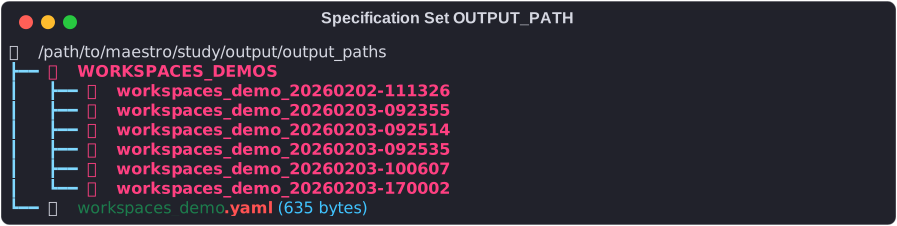
This OUTPUT_PATH is by default relative to $(SPECROOT), which is the location of your study specification. Inside of this directory Maestro will isolate each instance using the pattern <study_name>_datetimestamp where <study_name> is the description.name key in study specification. Thus multiple repeated instances of a study can be executed simultaneously, modulo timestamp conflicts. Below shows the directory containing our specification, workspaces_demo.yaml, and then the resulting OUTPUT_PATH directory setup relative to SPECROOT - the study specification location - with 6 executed instances of that study inside that containing directory:
CLI
The maestro run command has an optional override (-o/--out) for the OUTPUT_PATH which has different behavior than the OUTPUT_PATH variable in the study specification: this is meant to be the direct workspace containing the study outputs, i.e. the timestamped directory. This means isolation between multiple study instances is the caller's responsibility, with Maestro happily clobbering the old studies to put back in the same path. You can nest them under something like 'WORKSPACES_DEMO' above manualy by adding it to the path string and Maestro will create both directories. GNU Core Utilities' date command makes it trivial to recreate the timestamping pattern this way if you wish for fully cli parameterized control of the output directories:
Or the nested variant, recreating the hierarchical structure with each run call as the default behavior:
maestro run workspaces_demo.yaml -o "MANUAL_OUTPUT_DIR/workspaces_demo_manual_$(date +%Y%m%d-%H%M%S)"
As before, these paths are relative to $(SPECROOT), i.e. where your yaml study specification is located.
Step Level Workspace Control
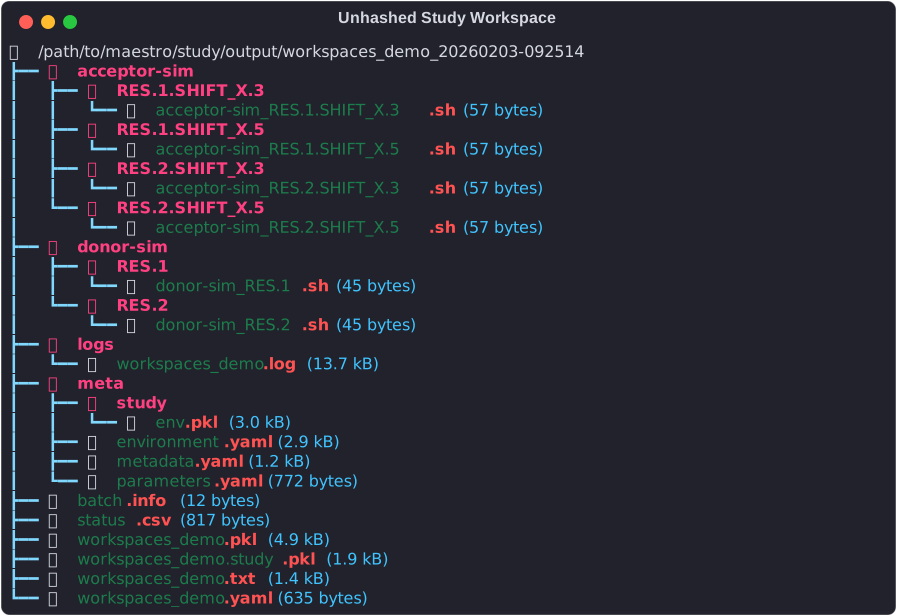
Additional controls are provided for the parameterized instances of steps within study's via optional hashing. The default behavior is to use string representations of the parameter combinations (via parameter's labels, i.e. label: RES.%% formatter in global.parameters) run through path sanitizer to handle spaces and other invalid path characters. For small studies, i.e. small numbers of parameters, this works reasonably well:
Some concerns to be mindful of here is that you may want to prevent the yaml readers from treating floats as actual floats due to the extra unwanted precision that can lead to if you're using simple numbers like 0.1, etc, that cannot be exactly represented in floating point form (note: python seems to handle printing at least some of these like 0.1 well, but some numbers will break this). As these parameters are intended to go through the shell which treats everything as strings, it can be useful to preserve the original form until the parameter reaches your application, and as a side effect keep the step workspace directory names a little more readable. See the next section for other options/concerns for dealing with floats.
Step workspace hashing
Currently the only two ways to control step workspace names are via the string typing control of floats described above, and a cli argument to the maestro run command: --hashws. Hashing can be a critical option in certain studies; large numbers of parameters, parameters that may be specifying paths or other long strings, or string representations of floating point numbers that require full 17+ digits can all lead to exceeding the system path and/or name length limits. Hashing is an option to mitigate this. However, going forward the new sortable algorithm should prove more desirable for it's improved readability and compactness in all cases.
MD5 algorithm (pre-1.2.0)
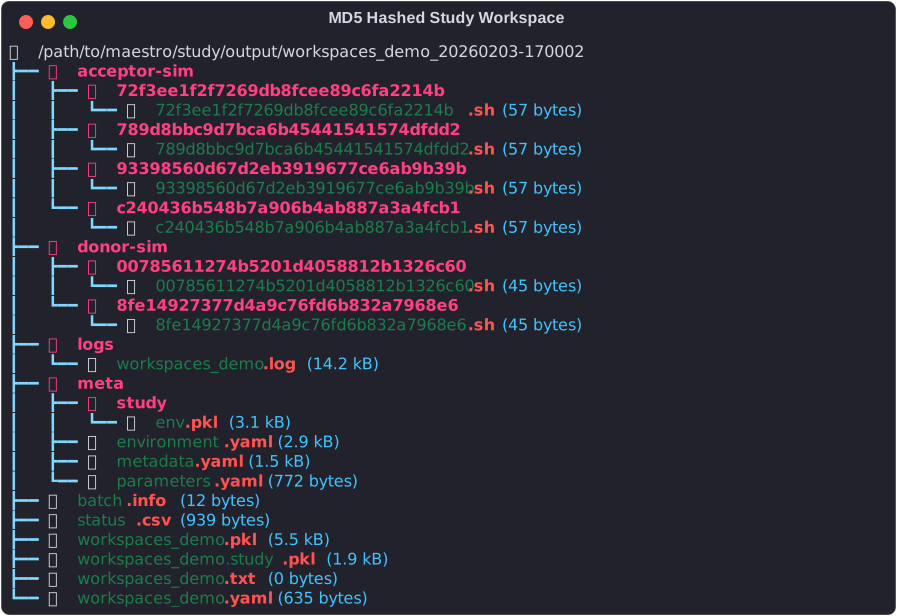
Initial implementation simply ran the string form of the steps' parameter combination through the md5 hashing algorithm. While this guarantees uniqueness, and does a good job limiting the size of the resulting paths, it is not very human friendly:
| Used Combo # | Sorted Parameter Values | Hashed step id/workspace |
|---|---|---|
| donor-sim used combo 0 | RES: 1 | 00785611274b5201d4058812b1326c60 |
| donor-sim used combo 1 | RES: 2 | 8fe14927377d4a9c76fd6b832a7968e6 |
| acceptor-sim used combo 0 | RES: 1, SHIFT_X: 3 | c240436b548b7a906b4ab887a3a4fcb1 |
| acceptor-sim used combo 1 | RES: 1, SHIFT_X: 5 | 72f3ee1f2f7269db8fcee89c6fa2214b |
| acceptor-sim used combo 2 | RES: 2, SHIFT_X: 3 | 93398560d67d2eb3919677ce6ab9b39b |
| acceptor-sim used combo 3 | RES: 2, SHIFT_X: 5 | 789d8bbc9d7bca6b45441541574dfdd2 |
Sortable Hash (>=1.2.0)
In Maestro >1.1.11, the md5 algorithm is replaced with an alternative that's more human readable, maintaining compactness, but also introducting sortable naming. Technically this is not a hash function as it cannot be applied to parameter combination strings independently, rather requiring knowledge of all instances of a step to apply a count based identifier. The format of this is as follows:
| Used Combo # | Sorted Parameter Values | Hashed step id/workspace |
|---|---|---|
| donor-sim used combo 0 | RES: 1 | donor-sim_instance_0 |
| donor-sim used combo 1 | RES: 2 | donor-sim_instance_1 |
| acceptor-sim used combo 0 | RES: 1, SHIFT_X: 3 | acceptor-sim_instance_0 |
| acceptor-sim used combo 1 | RES: 1, SHIFT_X: 5 | acceptor-sim_instance_1 |
| acceptor-sim used combo 2 | RES: 2, SHIFT_X: 3 | acceptor-sim_instance_2 |
| acceptor-sim used combo 3 | RES: 2, SHIFT_X: 5 | acceptor-sim_instance_3 |
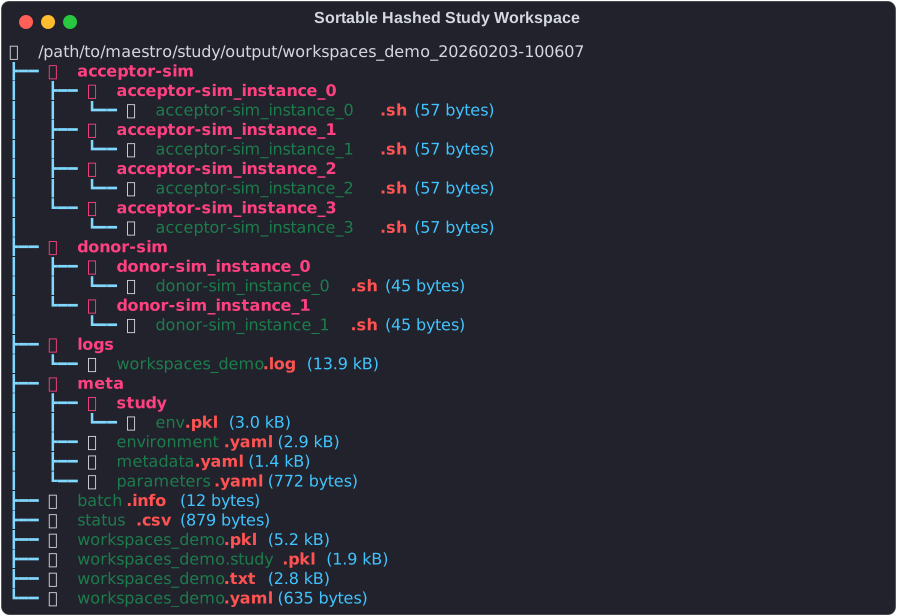
The naming follows the behavior of Maestro's parameter based graph construction, where for parameterized steps, Maestro generates one instance of that step for each unique set of values for the parameters used by that step. The resulting study workspace then becomes: